

Are you tired of spending countless hours creating and publishing posts across different social media platforms? You’re not alone. Social media managers often find themselves juggling multiple tasks, struggling to keep up with the constant demand for fresh content.
Enter social media automation. With the right tools, you can streamline your workflow, eliminate repetitive tasks, and finally focus on what matters—growing your brand and engaging with your audience. In this post, you’ll discover how to automate social media content creation and publishing using n8n. If you crave more free time and less stress, read on!
What Is n8n and Why Use It for Social Media Automation?
n8n is an open-source workflow automation tool with a user-friendly, drag-and-drop interface. You can use it to connect different apps, automate tasks, and create complex workflows—no coding required. For social media managers, this means no more manual copying and pasting or switching between tabs.
- Supports integration with popular social networks like Twitter, LinkedIn, and Facebook
- Lets you pull content from Google Sheets, RSS feeds, or even AI-writing tools
- Free to start and highly customizable
By leveraging n8n for social media automation, you’ll save time, reduce errors, and ensure a steady stream of engaging posts.
Getting Started: Setting Up n8n for Social Media Automation
Step 1: Install n8n
First things first—install n8n on your computer, server, or even use it in the cloud. You can find detailed installation guides on the official documentation.
- Quick local setup with Docker or npm
- Cloud-based version available for faster start-up
Step 2: Connect Your Social Media Accounts
Once n8n is running, it’s time to connect your favorite social platforms. n8n supports native integrations with many social networks, and you can use APIs for others.
- Visit the Credentials section in n8n
- Add your Twitter, Facebook, or LinkedIn account details
- Test the connections to make sure everything works
Step 3: Design Your Automated Workflow
Here’s where the magic happens. Build your first social media automation workflow by dragging nodes (apps, triggers, actions) onto the canvas.
- Choose a Trigger: This could be a scheduled time or a new item in your content calendar (e.g., Google Sheets).
- Add a Content Source: Pull content ideas from a database, spreadsheet, or RSS feed. Long-tail keywords like “automated social media scheduling” and “workflow automation for social media” fit well here.
- Insert a Formatter: Use n8n’s built-in functions to add hashtags, shorten URLs, or adjust post formatting.
- Add Your Social Media Nodes: Connect to your chosen platforms. Create a post node for each network.
- Test and Activate: Run the workflow once to check for errors, then activate it so your automation runs on its own.
Popular Use Cases for Social Media Automation with n8n
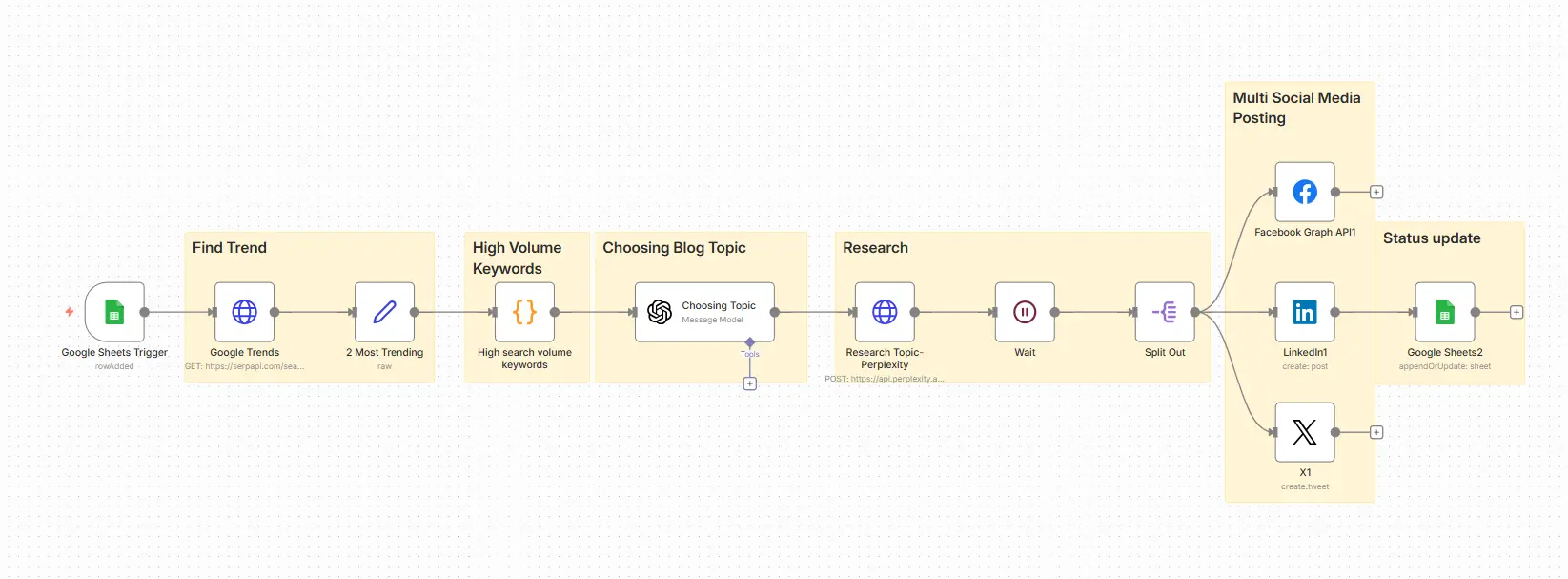
Need some inspiration? Here are practical ways social media managers use n8n to automate their daily grind:
- Bulk Scheduling: Schedule posts across multiple platforms from a single Google Sheet or Airtable.
- Content Curation: Automatically share trending industry updates via RSS feeds to your channels.
- User Engagement: Send personalized DMs or replies based on mentions or new followers.
- Reporting: Generate and email weekly performance reports to clients or your team with up-to-date analytics.
Best Practices for Social Media Managers Using Automation
While automation is powerful, it works best when handled with care. Here are a few tips to maximize your results:
- Balance Automation and Authenticity: Automate the repetitive, but keep room for real-time engagement.
- Review Scheduled Posts: Regularly double-check that your posts look good and are relevant before publishing.
- Keep Workflows Updated: As platforms and trends change, tweak your automations to stay current and effective.
- Monitor Performance: Track key metrics to ensure your automation efforts are driving results, not missed opportunities.
Conclusion: Streamline Your Social Media Automation With n8n
Social media automation isn’t just a buzzword—it’s a smart way to reclaim your time and boost your brand’s impact. By using n8n, social media managers can automate tedious tasks, maintain a consistent posting schedule, and scale their efforts without burning out.
Ready to get started? Take your first step by exploring n8n and building your own workflows. If you’ve got questions or want to share your experience, leave a comment below or share this post with your fellow social media managers. Let’s make working smarter the new normal!